
Key Takeaways
- RAG grounds answers in your knowledge; MCP connects AI to tools and live systems.
- They are complements, and retrieval can sit behind an MCP server.
- Access control and ownership matter more than which one you pick first.
What Is the Difference Between MCP and RAG?
RAG changes what a model knows. MCP changes what a model can reach and do. That’s the whole distinction, and most confusion comes from mixing the two.
RAG, short for retrieval-augmented generation, fetches relevant content from a knowledge source at question time and gives it to the model. The original RAG paper described swapping the knowledge source to update what a model uses, without retraining it. MCP, the Model Context Protocol, is an open standard for connecting AI applications to tools and data, including systems that take actions. Our guide to what MCP is covers the mechanics.
A useful test is to ask what’s missing. If the model lacks knowledge, such as a policy, a manual or last quarter’s figures, that’s a retrieval problem. If it lacks access, such as no way to check an order or file a ticket, that’s a connection problem.
Is MCP Replacing RAG?
No. They work at different layers. MCP is a connection standard, and RAG is a technique for grounding answers. A RAG pipeline can sit behind an MCP server and be offered to agents as a search tool, which is why the two often appear together.
Some teams skip RAG when their data is small, structured or live, and call it directly through MCP or an API instead. That’s a design choice, not a replacement.
Think of RAG as the library and MCP as the phone line. A library helps you answer a question, and a phone line lets you act on the answer. Agents often need both in the same task.
MCP vs RAG for Enterprise AI: How Do They Compare?
| Approach | What it is | Best for | Cost | Risk |
|---|---|---|---|---|
| RAG | Retrieves relevant content from your documents and feeds it to the model | Answering from policies, manuals and knowledge that changes | Ingestion, embeddings, a vector store, evaluation and re-indexing | Stale or poisoned content; leaks across teams with different permissions |
| MCP | An open standard for connecting AI apps to tools and live systems | Live data and actions: tickets, orders, code, files | Building and running servers, authentication and monitoring | Over-broad permissions; token misuse; instructions hidden in tool text |
| Both | Retrieval offered to agents as one tool among many | Agents that must know policy and act on systems | Both sets of costs, plus orchestration | Larger attack surface; unclear ownership |
We left out prices because they depend on data volume, vendors and scale. On risk, OWASP’s 2025 list treats vector and embedding weaknesses as a distinct RAG risk, including data leakage when a store mixes content with different permissions. For MCP, the specification’s security best practices forbid token passthrough and warn about confused-deputy attacks.
Which Should Your Enterprise AI Stack Use? A Simple Decision Flow
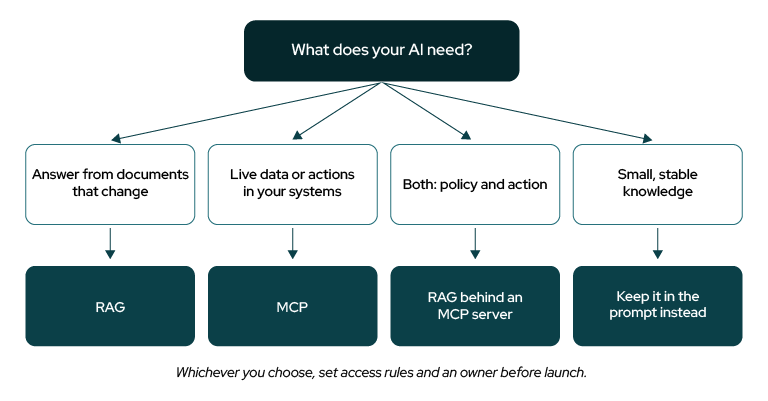
A simple MCP vs RAG decision flow.
Start with what the AI needs. Answers from documents that change point to RAG. Live data or actions point to MCP. Needing both points to RAG behind an MCP server. Small, stable knowledge can simply live in the prompt.
For example, a support agent might retrieve the refund policy with RAG, check order status and issue the refund through MCP, and ask a person to approve anything above a set limit.
Cognixia’s Source-Build-Embed View of Context Engineering
Context engineering means deciding what a model sees and can reach at each step. Our Loop & Context Engineering podcast [add URL once confirmed] explores it. We use Source-Build-Embed to apply it. Source is deciding what context matters. Build is the retrieval and tool layers. Embed is the access, freshness and ownership that keep them trustworthy. Our view: teams over-invest in Build and under-invest in who owns the content and permissions.
A quick self-check:
- Source: Can you list the questions the assistant must answer and where each answer lives?
- Build: Is retrieval tested on real questions, and are tools tested with bad inputs?
- Embed: Does every knowledge source and server have an owner, an access rule and a refresh schedule?
Two honest “no” answers? Fix those first. Our Source-Build-Embed page explains how we train for all three, and our Enterprise AI enablement work covers RAG, embeddings and vector stores.
How Do You Implement MCP Servers in the Enterprise?
Build one small server, prove it, then repeat. Five steps keep integration safe.
- Start with one read-only system. Pick a low-risk source, such as an internal knowledge base or ticket history.
- Decide whose identity it uses. Act as the requesting user or a tightly scoped role, not a shared super-account.
- Write clear tools and descriptions. Models read tool descriptions as trusted text, so review and version them.
- Log and test. Record every call, and test with bad inputs and unexpected outputs.
- Name an owner and a review date. Servers without owners become unmanaged integrations.
Treat third-party MCP servers like any other software dependency: review the source, pin versions and test on non-production data first. Keep a person in the loop for actions that move money or change records.
Frequently Asked Questions
Conclusion: Your Next Move
- Use RAG for what the model should know and MCP for what it can do.
- Combine them by putting retrieval behind an MCP server.
- Set access rules and owners before launch, whichever you pick.